Turning on AI customer support is easy. Keeping it accurate and under your control is the real work, and it happens before the first question ever arrives. The safest, most useful way to launch is to define four boundaries in advance: the knowledge your assistant answers from, what it is allowed to do, when it hands over to a human, and how its coverage matches the hours your customers actually ask. Get these four right and always-on support becomes an asset. Skip them and it becomes a liability you are not awake to catch.
This guide walks through each boundary as a practical, repeatable framework, with pre-launch inventory questions and a simple method for sorting which actions to automate. Think of it less as a list of restrictions and more as the operating brief you would give any capable new hire on their first night shift.
Always-on support is a setup problem, not a switch
There is a quiet assumption behind a lot of automation decisions: that switching on AI support is the hard part, and everything after that takes care of itself. In practice, the opposite is true.
For lean teams, this matters more than for anyone else. When you run a large support department, you can absorb the occasional wrong answer or overstep. When you are the founder, the operator and the support lead all at once, you cannot. Every interaction carries your name, and you are not personally online to catch the ones that go sideways.
So the useful question is not "should we use AI for support?" It is "what boundaries do we set so that always-on support stays accurate, controlled and genuinely helpful while we sleep?" If you have already read the real cost of after-hours customer messages for small teams, consider this its practical counterpart: the cost is real, and defined boundaries are how you address it without trading one problem for another.
Boundary one: define the knowledge it answers from
The fastest way to lose trust in automated support is a confident answer that is quietly wrong. It rarely needs to be dramatic. An outdated return window, a policy that changed last month, a detail that was never true in the first place, any of these erode the very thing after-hours coverage is supposed to protect: customer confidence.
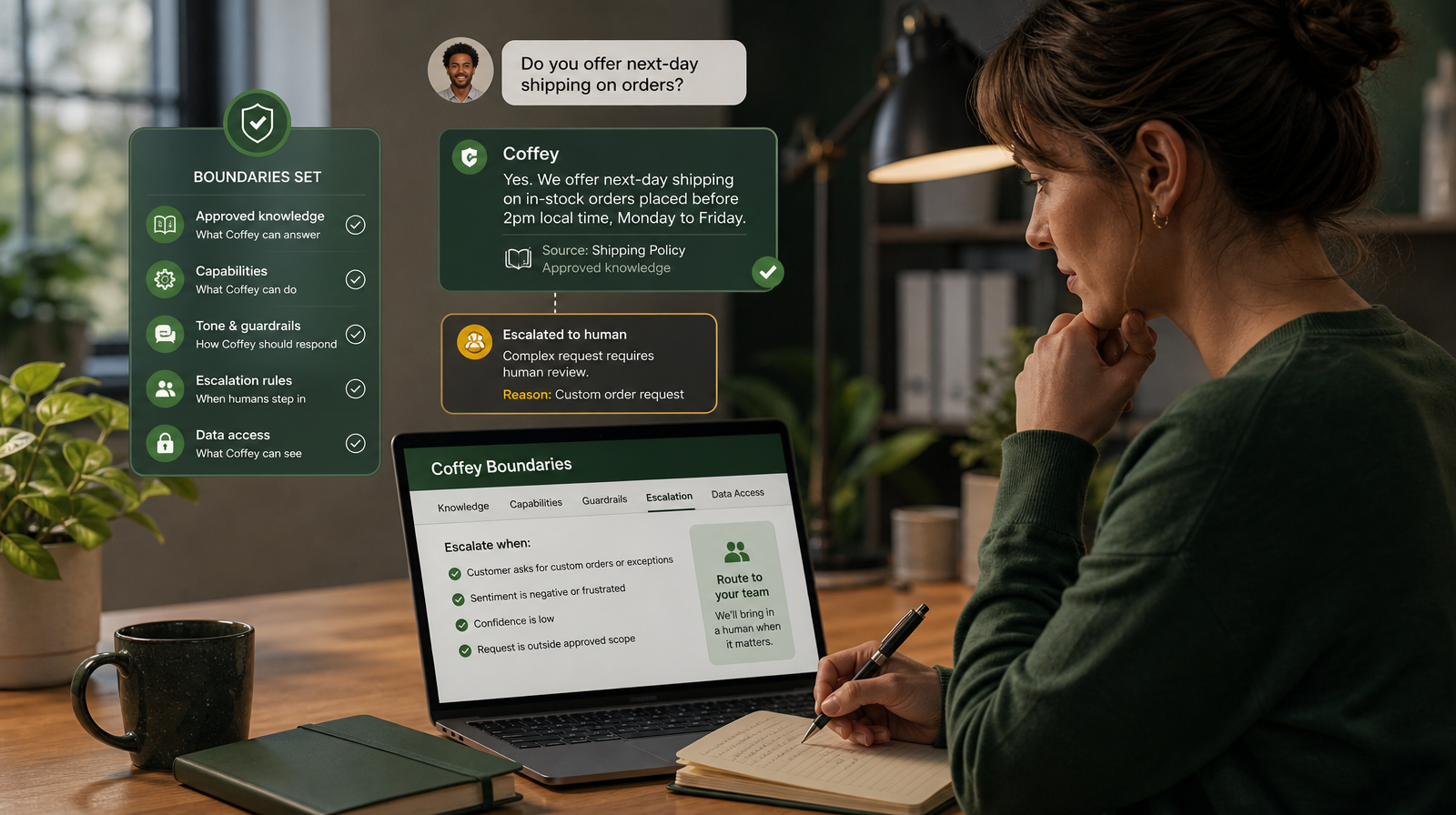
The boundary here is straightforward. An AI support assistant should answer from knowledge you have approved, not from whatever it can improvise. This is a core principle behind how Coffey works. It responds using your approved knowledge, so the source of an answer is something your team has already stood behind rather than a plausible-sounding guess.
Before you go live, run a short knowledge inventory:
- What do customers actually ask most often? Start from your real inbox, not a hypothetical list.
- Where do the correct answers currently live? Policies, FAQs, product notes, onboarding docs, shipping terms.
- Which of those are current and approved? Retire anything stale before it becomes an overnight answer.
- What is deliberately out of scope? Note the topics you would rather the assistant never attempt.
The goal is not to document everything. It is to make sure the material the assistant draws from is material you would be comfortable seeing quoted back to a customer at three in the morning.
Boundary two: decide what it is allowed to do
Answering a question is one thing. Taking an action on live data is another, and the two deserve different levels of caution.
Some requests are purely informational: What are your hours? Do you ship internationally? How do refunds work? Others ask the assistant to do something that touches live systems. The distinction matters because the second category is where an unbounded tool can cause real harm, and where a controlled one earns its keep.
Coffey acts on live data through capabilities you control. That phrasing is deliberate. The actions available to the assistant are not a default you inherit; they are a choice you make. You decide which capabilities are switched on, and anything you have not enabled simply is not available to it.
A three-bucket method for sorting actions
Before launch, take every action you might want to automate and drop it into one of three buckets:
- Safe to enable now. Low-risk, clearly defined, easy to verify. Sharing order status, confirming published policy, answering documented product questions.
- Enable later, with care. Useful but sensitive. Worth watching your assistant handle the safe bucket first, then widening access once you trust the pattern.
- Never automate. Anything involving judgement, money movement beyond your comfort, or an irreversible change you would want a person to own.
Starting narrow is not timidity. It is how you build confidence on evidence rather than hope. You can always widen a boundary you trust. It is far harder to rebuild trust after an overstep.
Boundary three: draw a clear line for human escalation
The most reassuring thing about a well-configured support assistant is not what it answers. It is what it knows to hand over.
There is a persistent myth that the point of AI support is to remove humans entirely. It is not, and treating it that way is where teams get burned. The point is to let automation handle the routine and repetitive so your people spend their limited hours on the conversations that genuinely need them.
Coffey escalates to your team when a human is needed. Designing that handoff well is one of the highest-leverage decisions you can make before launch. Work through three questions:
- What should always reach a person? Complaints, edge cases, anything emotionally charged or commercially significant.
- What context should travel with an escalation? A handoff that arrives with the full conversation attached saves your team from asking the customer to repeat themselves.
- What does the customer experience while they wait? A clear, honest "this is going to a member of our team" is far better than silence or a forced, unhelpful answer.
Handled well, escalation stops being a failure state and becomes a feature. Customers do not resent a considered handoff. They resent being stuck with a tool that pretends to know more than it does.
Boundary four: match coverage to how your customers actually behave
The whole premise of always-on support is that customer questions do not keep office hours. They arrive in the evening, over the weekend, and across time zones you are not personally awake for. Coverage that never sleeps is the point, and it is what Coffey is built to provide for small businesses and lean teams across every timezone.
But coverage works better when it is shaped around reality rather than assumption. Before you go live, look at the actual pattern of when questions come in:
- When do most after-hours messages arrive? These are your priority windows.
- Where are your customers based? If they span time zones, "after hours" for you is prime time for them.
- Which questions dominate the quiet hours? They are often simpler and more repetitive than daytime queries, exactly the kind a well-bounded assistant handles cleanly.
This is where the first three boundaries pay off. Approved knowledge keeps overnight answers accurate. Controlled capabilities mean nothing happens that you did not sanction. A clear escalation line means the genuinely nuanced overnight case waits, with context, for your morning review rather than being forced through. Coverage becomes something you extend deliberately, not something that runs unattended and hopes for the best.
A pre-launch checklist
Bring the four boundaries together into one review before you switch anything on:
- Knowledge: approved sources inventoried, stale material retired, out-of-scope topics noted.
- Capabilities: every candidate action sorted into safe now, later with care, or never automate.
- Escalation: triggers defined, context set to travel with handoffs, waiting message written.
- Coverage: priority hours and time zones identified, common overnight questions mapped.
If you can tick all four, you are not launching an open-ended system and hoping it behaves. You are launching a defined operating brief.
Putting the four boundaries together
Read individually, each boundary is sensible. Read together, they describe a single idea: **always-on support should be as capable as you allow